Wear OS
Liftz on your Wear OS watch.
During a session started on your phone, the current set shows on your watch: you adjust the reps, load and RPE, log the set, and the watch buzzes when your rest is over.
Liftz is in closed testing on Android; there is no watch app on the iPhone side.
Published · updated
01 The set on your wrist
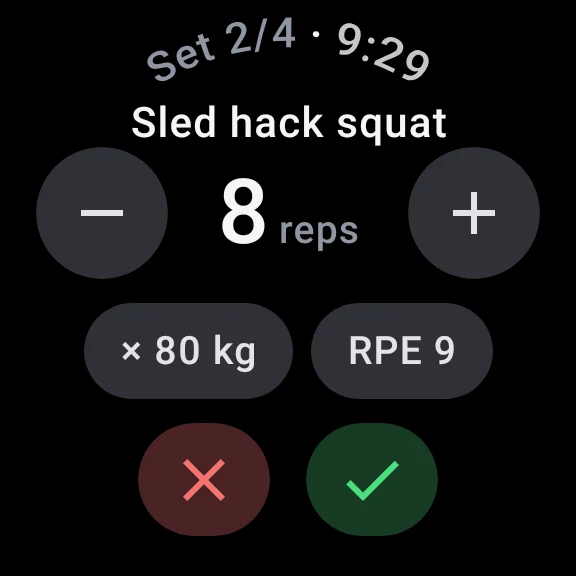
The set screen shows the set your phone is waiting for: its place in the exercise and the time at the top (“Set 2/4 · 9:29”), the exercise name, then the reps in large type, between − and +. The bezel or the crown adjusts them too, step by step, with a light buzz on each step.
Below, two chips sum up the load and the RPE (“× 80 kg”, “RPE 9”): a tap opens their own screen. At the bottom, ✕ skips the set and ✓ logs it: “Validating set...” shows while the phone records it, with the values you set, then the rest begins.
− and + apply at once on the watch, and the phone’s notification follows. Done and Skip wait for the phone’s answer.
02 Load and RPE
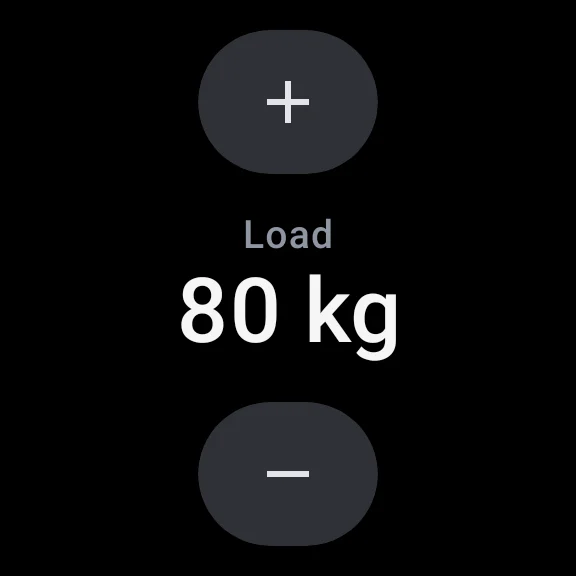
Tapping the load or the RPE opens its screen: + at the top, − at the bottom, the value in the middle, and the bezel or the crown to go faster. Swipe right, or tap the value, to go back to the set.
The load moves along the steps the phone sends, those of your equipment, the same as in the notification: a + never lands on a load you cannot build. The RPE goes from 5 to 10, by half points.
An RPE left empty shows “RPE 9”, dimmed: in Liftz, a set without RPE counts as RPE 9, and the first tap starts from there.
03 The rest
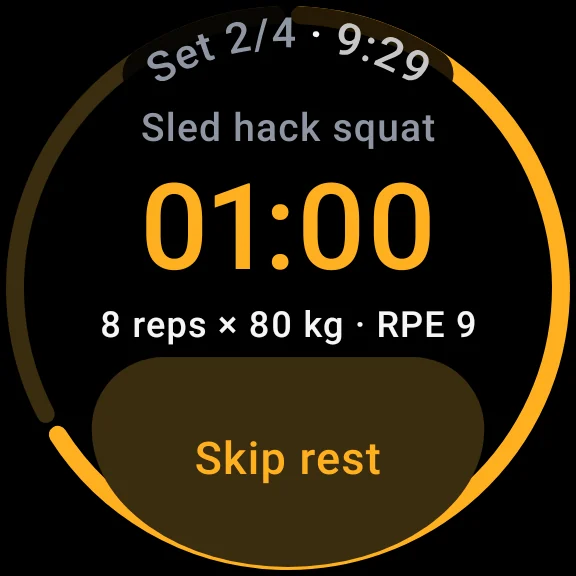
After the set, the rest screen: a ring around the edge that empties, the countdown in large type, the next set below, and “Skip rest” at the bottom. Nothing is adjusted during the rest.
When the rest is over, the watch buzzes for a long moment, even when the app is not on screen: the phone tells it, at the moment it rings the end of the rest itself, usually in under a second over Bluetooth. The next set’s entry then comes back. If you take your time, the overrun shows in red at the top of the screen (“Set 2/4 · −00:12”), in place of the time.
04 During the session
As soon as a session starts on the phone, the watch puts a silent Liftz icon on the watch face and in recent apps; a tap opens the set screen. On Wear OS 4 and later, it asks for the notifications permission for this; if you refuse, the app works without the icon.
By default, nothing opens on its own. To have the set screen open as soon as a session starts, open Liftz on the watch outside a session, scroll the “No workout in progress” screen and turn on “Open when a workout starts”. The setting lives on the watch and survives a restart.
A set changed on the phone updates on the watch. When the session ends on the phone, the watch goes back to “No workout in progress” and the icon goes away.
05 What it does not do
- No standalone app. The session lives on the phone, and the watch records nothing itself: without the phone, it has nothing to show.
- No starting or finishing a session. Both happen on the phone.
- Phone unreachable. A tap that does not reach the phone shows “Phone unreachable”, and the value goes back to the phone’s.
- No heart rate, no tile, no watch-face complication.
- No Apple Watch. On the iPhone side there is no watch app; the iPhone version of Liftz is planned, with no date.
06 No watch: the notification
Without a watch, the same idea lives in the workout notification, on Android: expanded, it shows the current set with three − value + rows (Reps, Load, RPE), then “Skip set” and “Done”. The set is logged without opening the app, and the notification shows on the lock screen too.
 Liftz · Push · 00:13
Barbell bench press
Set 1/4
During the rest, the countdown shows next to the exercise name and “Skip rest” replaces both buttons; collapsed, the notification keeps the reps, the load and RPE summary, and Done. It does not appear on the watch: Wear OS does not pass on the notification of an ongoing session.
07 Compatible watches
A watch on Wear OS 3 or newer: Galaxy Watch from the Galaxy Watch 4 on, Pixel Watch, and other watches on Wear OS 3 and later. It must be paired with an Android phone running Liftz 0.13.0 or newer: with an older version, the phone sends nothing and the watch stays on “No workout in progress”.
The app has been tried on a Galaxy Watch; other models have not been yet. If a watch misbehaves, write to contact@liftz.fit.
08 Installing the watch app
During the closed test, the watch app is for testers only, and goes through the same group as the phone: once Liftz is on your phone through the testers page, there is nothing else to join.
On the watch, with the same Google account as the phone: Play Store → “Apps on your phone” → Liftz, then Install. Open it once: it shows “No workout in progress” until your next session.
09 Your data
During a session, the phone sends the watch the current set (exercise, reps, load, RPE) and the rest; the watch sends back your taps. Nothing else from your logbook goes across, and nothing is sent unless the app is installed on the watch.
The link is Google Play services, which connects the phone and the watch over Bluetooth or Wi-Fi, and may go through Google’s servers when they are out of range of each other. On the watch, two permissions: notifications, for the silent session icon, and vibration. It is all in the privacy policy.
10 Try Liftz
The watch and the notification are part of Liftz’s free logbook. Liftz is in closed testing on Android: the test is free, and testers keep Pro for life as long as they stay enrolled. The iPhone version is planned, with no date.